Self-Monitoring Horizon RDSH Host

If you manage VMware Horizon or Omnissa Horizon environments, you already know that a server being powered on is not the same thing as that server being healthy from the Connection Server/broker’s point of view. An RDSH host can look perfectly fine while the Horizon Connection Server sees something very different.
That is the problem this project is designed to solve.
This is a simple local automation script that runs on each RDSH host and checks its own Horizon `AgentStatus` directly via the related Connection Server API, on a schedule, without waiting for an administrator to manually investigate. The immediate goal is visibility and logging. The longer-term goal is automated recovery if the host’s relationship with Horizon is disrupted.
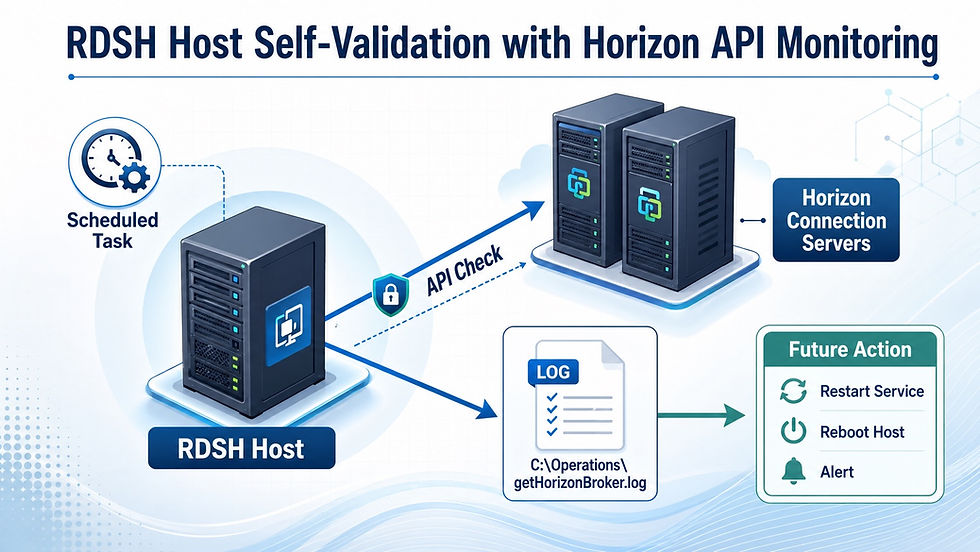
RDSH Host Self-Validation with Horizon API Monitoring
The core idea
The host asks a simple but important question every 15 minutes:
What does the Horizon Connection Server/Broker think my status is right now?
That is a better operational signal than relying only on local services, CPU, memory, or whether the server is reachable on the network. In a Horizon environment, the Connection Server is the authoritative source for whether the host is actually usable for brokering.
If that relationship breaks, the RDSH host needs to know.
What we built
This experiment here uses two scripts:
`Get-HorizonBroker.ps1`
This is the worker script. It runs on the RDSH host, discovers the correct Connection Server, authenticates to the Horizon API, and retrieves the local machine’s `AgentStatus`.
`Add_Scheduled_Task.ps1`
This installs a Scheduled Task under the `\Operations\` task folder so the worker script runs automatically every 15 minutes as `SYSTEM`.
That gives the host a repeatable, self-contained health check loop.
How it works
The process is straightforward, but the value is in the details.
First, the script reads the Horizon broker information from the local registry. In many environments, that broker value contains more than one Connection Server. Instead of treating it as a single invalid hostname, the script separates each server and tests them individually until it finds one that responds.
Next, the script authenticates to the Horizon API and identifies the Connection Server version. That matters because older and newer Horizon versions can behave differently, especially when it comes to inventory queries and pagination.
The script then determines what kind of machine it is running on. If it is running on an RDSH host, it prefers the `rds-servers` inventory path instead of treating the host like a regular desktop machine. That makes the lookup more accurate for published application and session host environments.
Finally, once the script finds the matching inventory record, it captures the `AgentStatus` and writes the result to a local rolling operations log.
Why the scheduled task matters
Running this manually is useful for troubleshooting. Running it automatically makes it an operational control.
The Scheduled Task runs every 15 minutes as `SYSTEM`, ensuring the server can perform the check consistently, whether or not an administrator is logged on. That gives operations teams a lightweight, always-on validation mechanism directly from the machine that matters most.
This is the beginning of self-healing infrastructure.
Logging and future direction
Each run creates detailed debug output for troubleshooting, but it also appends a clean summary entry to:
`C:\Operations\getHorizonBroker.log`
That summary includes:
- timestamp
- local server name
- Horizon Connection Server name
- `AgentStatus`
The log is capped to prevent endless growth, and it provides the host with a simple local history of its Horizon health.
Today, that history helps validate stability and investigate issues. Tomorrow, it can drive automated action. If the `AgentStatus` shows that the host is no longer healthy, the next step could be restarting a service, draining the server, alerting operations, or automatically rebooting the host.
That is where this work is headed.
Why this approach is valuable
What makes this useful is that it shifts the host from passive monitoring to active self-awareness. Instead of asking only whether Windows is alive, it asks whether Horizon still trusts the host to do its job.
That is a much better signal for real service health.
In virtual desktop and published application environments, that difference matters. A host that can verify its own broker relationship is much closer to becoming a host that can protect itself.
Conclusion
This project aims to build a smarter RDSH host. By combining broker discovery, Horizon API validation, scheduled execution, and local logging, we are creating a simple yet powerful automated health checking and, eventually, automated remediation.
The server is no longer just waiting for someone to notice a problem. It is learning how to verify its own status and prepare to act when something goes wrong.
Disclaimer
Use this at your own risk. This script and process are provided as-is, without warranties or guarantees of any kind, express or implied, including fitness for a particular purpose, reliability, or suitability for your environment. Always test thoroughly in a non-production environment before deploying, and you assume full responsibility for any impact, changes, outages, or data loss resulting from its use.


Comments