Horizon Cloud and Entra ID SSO: What to Validate Before You Pilot
- Christopher Reed

- Apr 28
- 3 min read
You are hearing a lot about modernized identity flows for virtual desktops because the next phase of cloud-centric SSO is here. For Horizon Cloud, the signal is clear: Omnissa is moving deeper into Microsoft's identity stack so organizations can strengthen authentication while reducing friction for users launching virtual desktops and apps.
The latest Horizon Cloud updates point toward SSO into Microsoft Entra-joined Windows 11 and Windows Server 2025 endpoints, but there are specific prerequisites and behavior to validate early. The most important starting point is the Omnissa Knowledge Base article on Entra ID SSO for Horizon Cloud Services.


Current State of Play
Supported platforms: Windows 11 24H2 with the October 2025 Security Cumulative Update or later, and Windows Server 2025 with the January 2026 Security Cumulative Update or later, are called out for the Horizon Windows client and Entra ID-based SSO flows. See the Omnissa Knowledge Base.
Identity experience: Native Entra ID sign-in is being introduced so users can authenticate through Microsoft's identity platform and launch desktops without repeatedly entering credentials. Omnissa has discussed this in the community roll-out post.
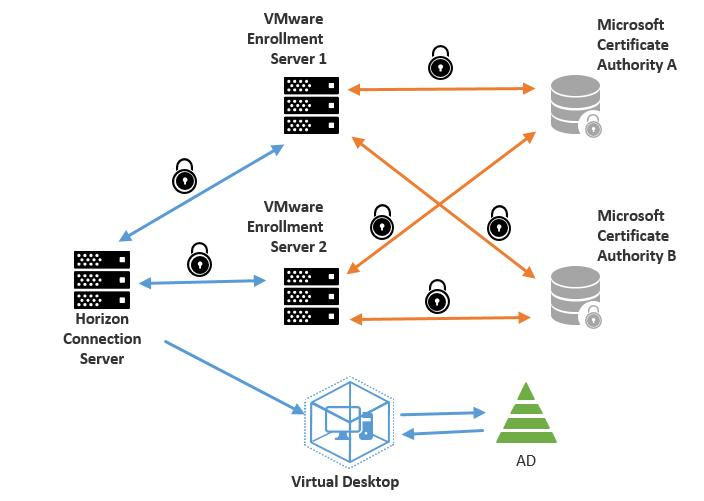
Infrastructure requirements: Connection Servers still need domain joins and proper trust relationships for certificate lookups. Certificate services and True SSO templates still matter for machine-based smart-card or SSO designs. The setup details are covered in the Omnissa Horizon documentation.
Patching discipline: Windows Server 2025 hosts involved in connection and SSO paths need current cumulative updates to avoid avoidable compatibility problems. Omnissa calls this out in the Windows Server 2025 Horizon support KB.
What Changed
The big shift is that identity is becoming a more native part of the Horizon Cloud user path. Instead of treating cloud identity as an external front door and then falling back into traditional desktop authentication patterns, the updated flow points toward a cleaner Entra ID experience for supported Windows 11 and Windows Server 2025 targets.
That does not remove the need for disciplined Horizon architecture. It raises the bar. Image baselines, Windows cumulative updates, Horizon Client versions, certificate services, True SSO templates, UAG behavior, conditional access policy, and token refresh behavior all become part of the same user experience.
Pilot Checklist
Windows version enforcement: Confirm that gold images are running supported Windows builds and required cumulative updates before a pilot group touches them.
SSO flow testing: Validate sign-in from the client through UAG and Horizon Cloud, then watch token issuance, refresh timing, session behavior, and conditional access impact.
Token and certificate behavior: Review how certificates are presented to VMs through True SSO and how primary refresh tokens or SAML assertions are handled by the Horizon agent path.
Failure-path testing: Test expired credentials, MFA prompts, conditional access blocks, stale devices, disconnected sessions, and image rollback scenarios before broad release.
User communications: Let pilot users know what should feel different, especially if their normal sign-in prompts change.
What It Could Mean
For EUC teams, this is less about a single SSO feature and more about the operating model behind modern virtual desktops. Cloud identity, Windows image governance, patch baselines, certificate plumbing, and user experience are becoming one design surface.
The practical move is to pilot narrowly. Use a small group, measure sign-in success, watch conditional access behavior, and keep the image and patch baseline locked down. If the pilot succeeds, the payoff is strong: fewer credential prompts, cleaner cloud identity alignment, and a Horizon Cloud experience that feels more consistent with the rest of the Microsoft 365 security stack.


Comments